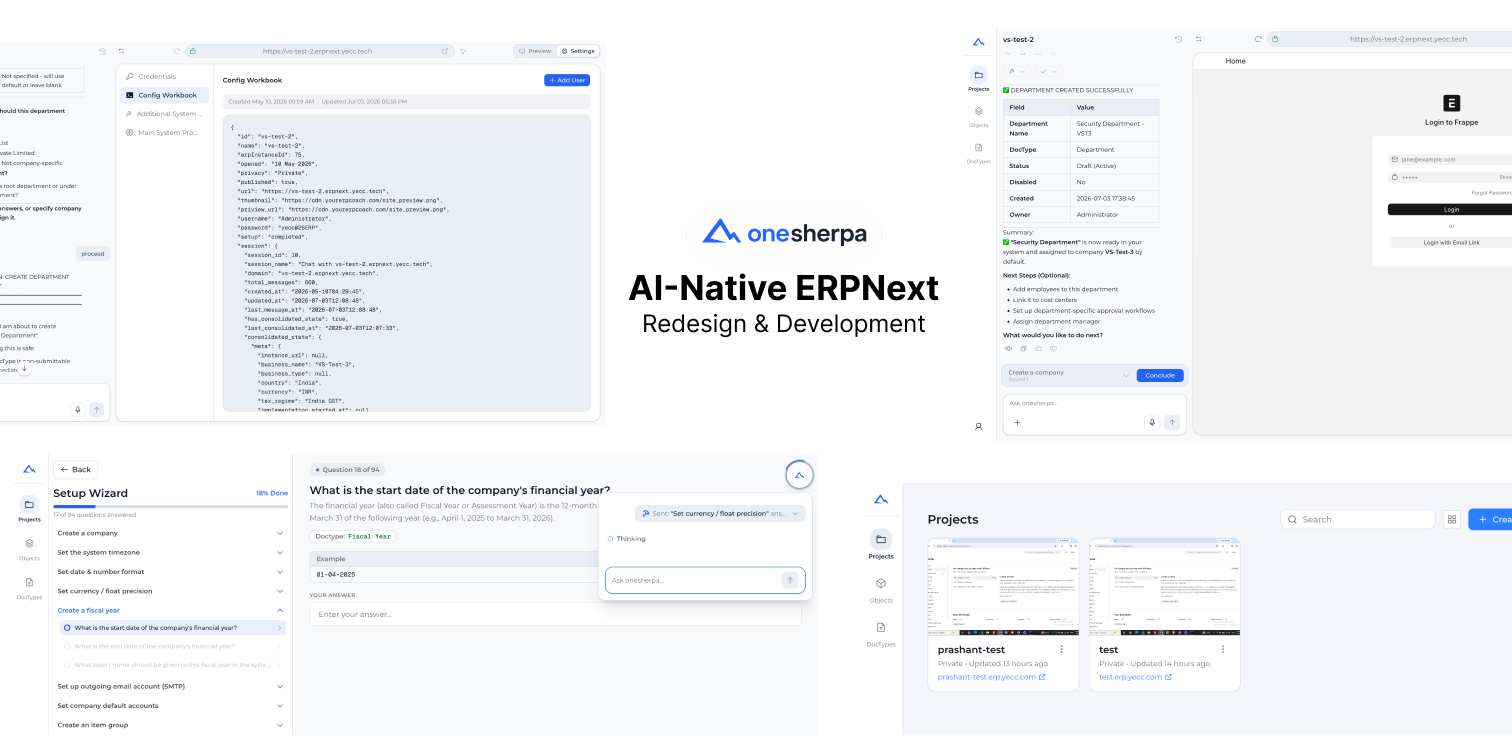
A freelance AI-native SaaS that lets business owners and consultants implement ERPNext by describing what they need in plain language. I rebuilt the pipeline as four LangGraph agents running on Claude Haiku, cutting inference cost more than 60%, and designed and built all five core screens myself.
Why it exists
Setting up ERPNext usually means hiring a consultant who knows the configuration screens well enough to translate what a business actually needs into the right modules, fields, and settings. OneSherpa is built on a simple bet: if you can describe what you need in plain language, across accounting, selling, buying, stock, manufacturing, projects, CRM, HR and payroll, assets, or quality, the platform should be able to configure it for you, so an owner or a consultant can self-serve instead of waiting on an implementation partner.
The flow is three steps: implement, customize, run. Stand up a working setup in one sitting, describe changes as you go instead of hunting through settings menus, then publish once you've reviewed what's about to go live.
Re-engineering how it thinks
The first version ran its AI on a linear pipeline, one step handing off to the next with no way to loop back if a step needed more information or a user changed their answer halfway through. That falls apart fast in an implementation flow, where someone regularly needs to revisit an earlier decision once a later one changes the picture.
I re-engineered the orchestration around LangGraph instead of the linear chain, which gave the pipeline actual loop control and shared state across steps. A decision made in the questionnaire can now feed back into an earlier step without restarting the whole conversation, and the system keeps track of what's already been decided instead of re-asking.
I split the single chain into four agent roles, a retriever, a planner, an executor, and a validator, each running as its own node in the graph instead of one long function doing all four jobs. That split means I can test each role on its own, swap the model behind any one node without touching the others, and see exactly which node failed instead of guessing which part of one long chain broke. It's deployed on Google Cloud Run, so every request runs in its own isolated instance that scales up or down with load, and each node gets retries with checkpointing, so a failed step resumes from where it left off instead of restarting the whole run.
Claude Haiku is the primary model behind the agents now, which cut inference cost more than 60% against GPT-4 without giving up response quality. I also wired the whole pipeline through LangSmith, so I can trace a run node by node and catch a regression in one agent before it turns into a wrong answer somewhere downstream, which matters more each time a new ERPNext module gets onboarded into the flow.
Redesigning and building the screens
Alongside the backend rebuild, I redesigned and built the core screens myself, front end included: the dashboard, the chat screen, a two-stage questionnaire page, and the chat screen settings page.
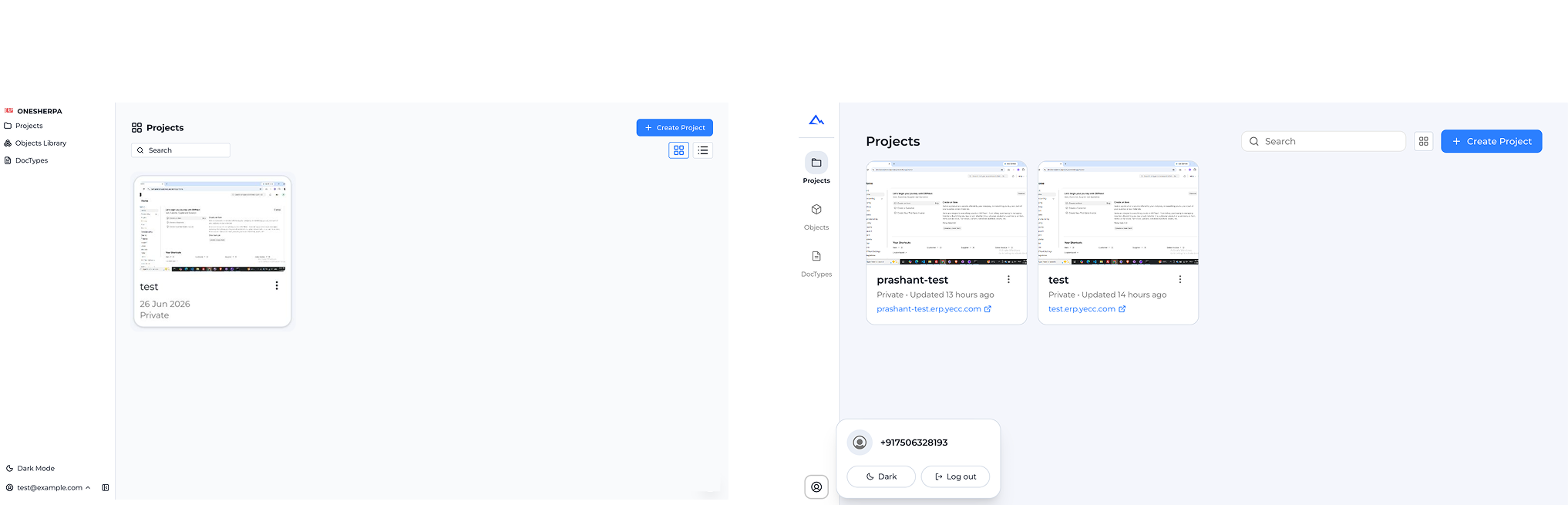 Project cards on the old dashboard showed a title, a date, and "Private," and nothing else, so telling one project from another meant opening each one and checking. A card now carries a live thumbnail of the actual site next to its real URL. You can tell which project is which by what it looks like instead of by its name in a list.
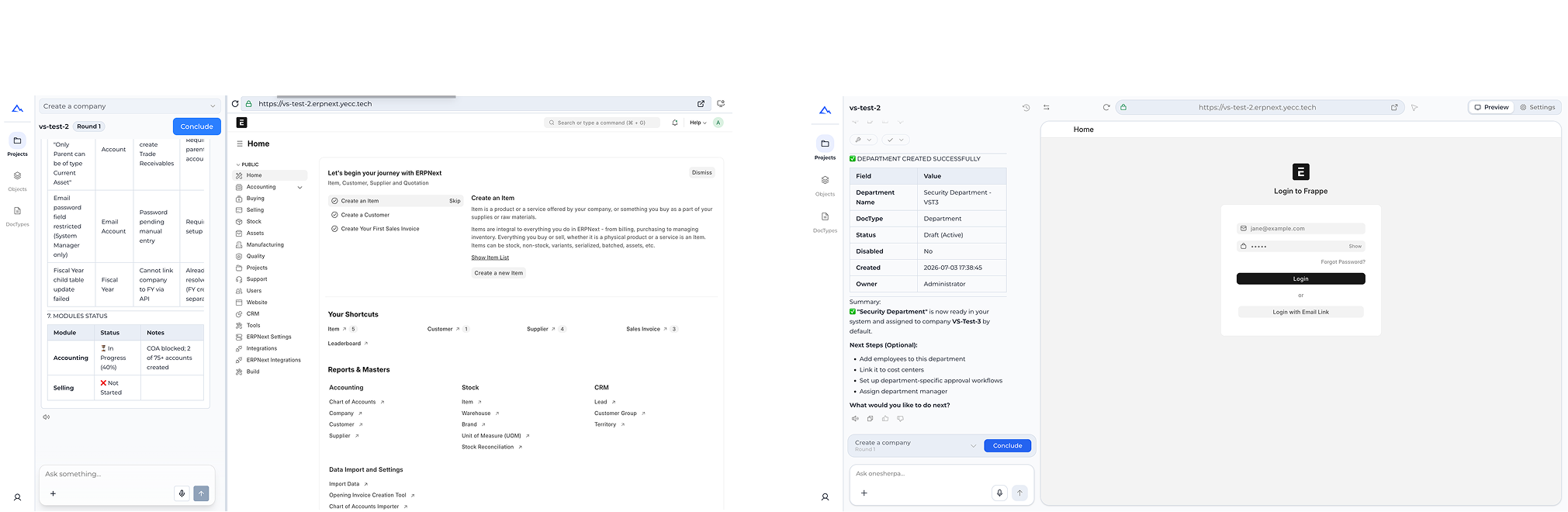 The old chat panel sat next to the raw ERPNext admin backend, a full sidebar running from Accounting to Manufacturing to CRM, so confirming what had just happened meant reading that admin screen yourself. It now sits next to a plain summary card, "Department Created Successfully" and the fields that changed, with a live preview of the real site running alongside it. You can see the result of what you asked for without knowing how to read ERPNext at all.
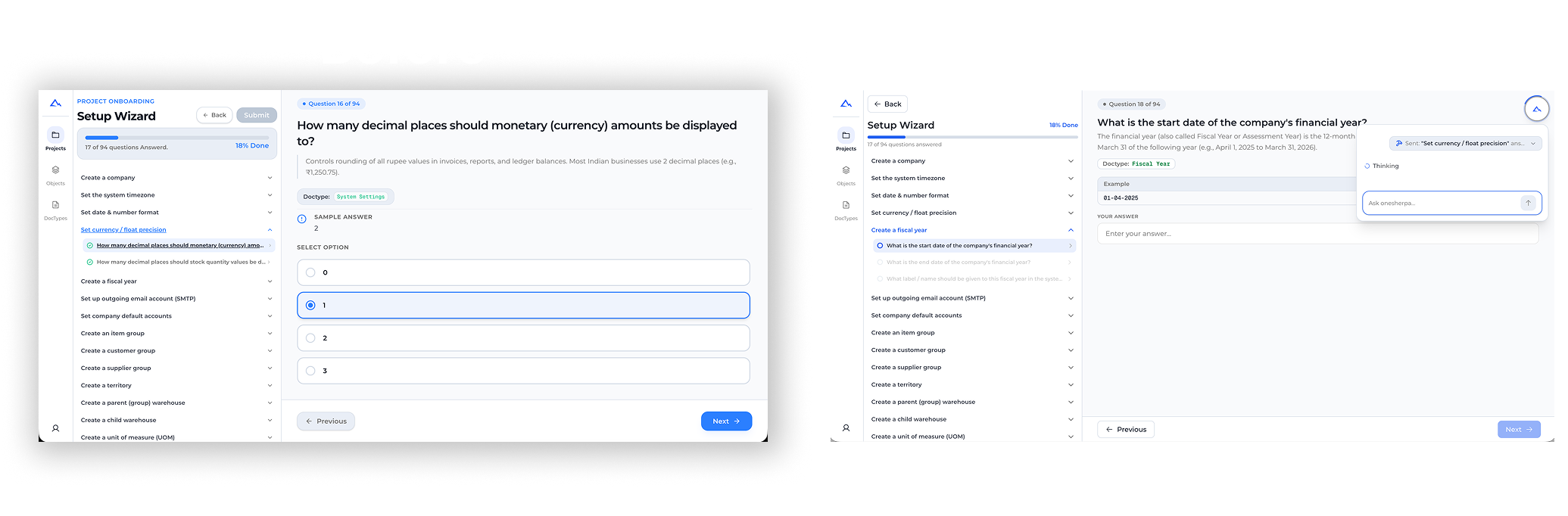 The old questionnaire only offered fixed multiple-choice buttons. If none of them matched your situation, you picked the closest one and moved on. The second stage now swaps those buttons for an open text field with an example above it, plus a floating "Ask onesherpa" widget docked on screen, ready to answer a question right where you got stuck instead of leaving you to guess from a list that doesn't fit.
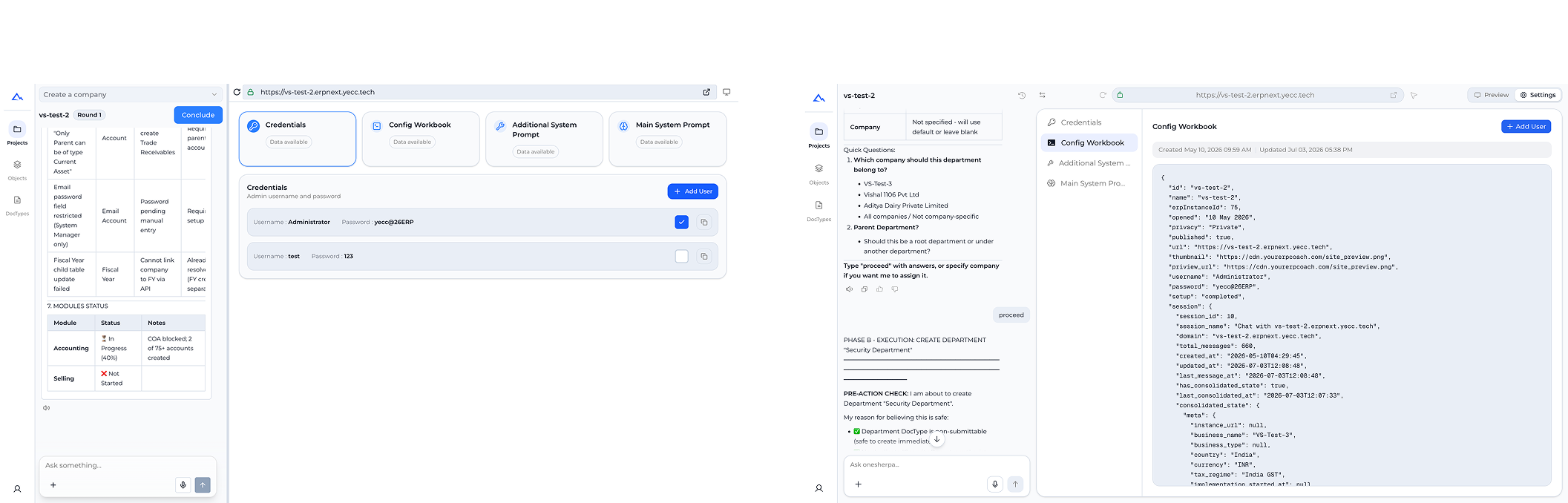 Settings used to be four flat cards, and opening Credentials showed the raw admin username and password sitting in plain text next to a copy button. The redesign turns that into three panes: settings down the left, the setup conversation itself running through the middle with a visible check before anything gets created, and the selected item on the right, now a structured, syntax-highlighted JSON view instead of a password sitting out in the open.
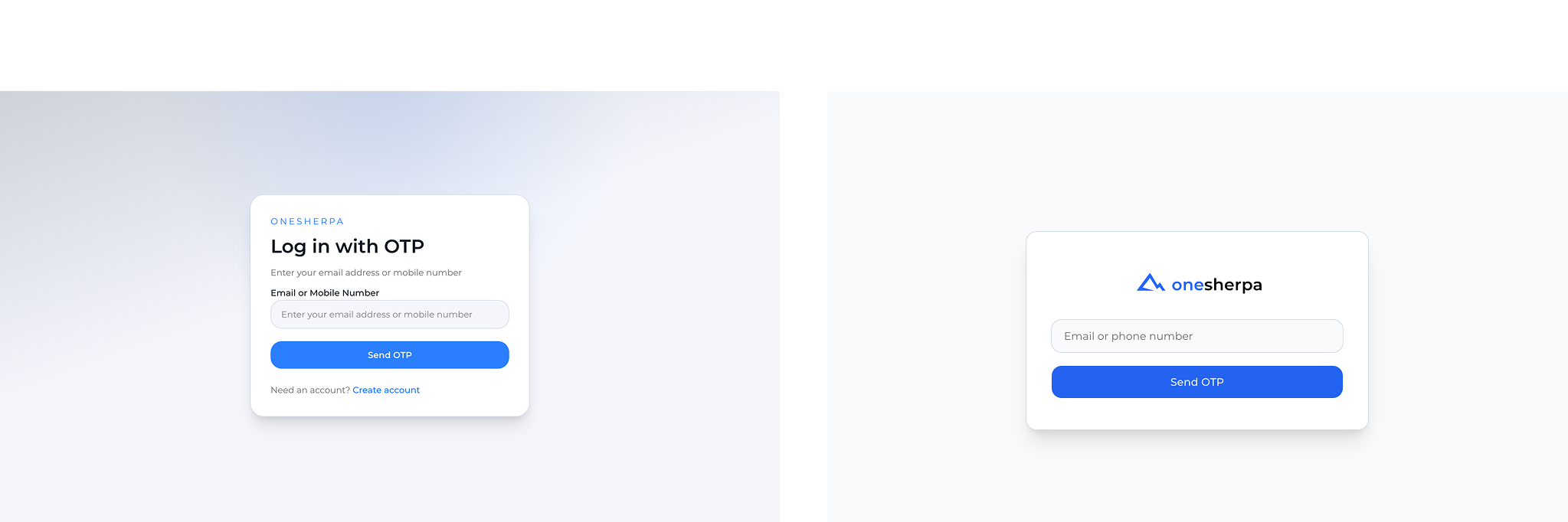 The old login card carried a small caps "ONESHERPA" label, a "Log in with OTP" headline, a labeled input, and a "Need an account? Create account" link underneath. Now it's just the real logo sitting above an unlabeled "Email or phone number" field and the send button, so the first thing you see is one field to fill in, not a page to read first.
I also added a floating widget chat window that sits over the implementation flow. Instead of a user staring at a long list of ERPNext options and guessing what applies to them, they can ask the widget a question mid-setup and get pointed at the specific thing to configure next, which cuts down the decision fatigue of not knowing what to implement out of everything ERPNext exposes.
Where it stands
This is a freelance build I'm still working on. No adoption numbers yet, the work so far has been the orchestration rebuild and the screen redesigns above.
The real lesson I took from this build is that ERPNext's power didn't need to be dumbed down or stripped out, it needed a translation layer between plain language and the real configuration sitting underneath. The four agent roles, retriever, planner, executor, validator, aren't there to simplify what ERPNext can do, they're built to navigate the full complexity of it on someone's behalf. The screens I redesigned follow the same idea: the settings pane shows a structured, syntax-highlighted JSON view instead of hiding what's actually there behind a plainer form, and the chat screen shows "Department Created Successfully" instead of making someone read the raw ERPNext admin sidebar, but everything underneath, accounting, selling, buying, stock, manufacturing, projects, CRM, HR and payroll, assets, quality, stays fully intact and reachable. The floating "Ask onesherpa" widget is the same instinct again: instead of trimming down the list of options ERPNext exposes, it gives someone a way to ask what applies to them right where they're stuck.